
Club management, billing first

Run your club. Keep the billing correct.

Members and families, groups and sessions, attendance, trainers and invoices in one system for sports clubs. With invoicing you can preview, check and trust.

Interface in Estonian and English. Bank statement import for LHV and Swedbank. Card payments through your own Stripe account.

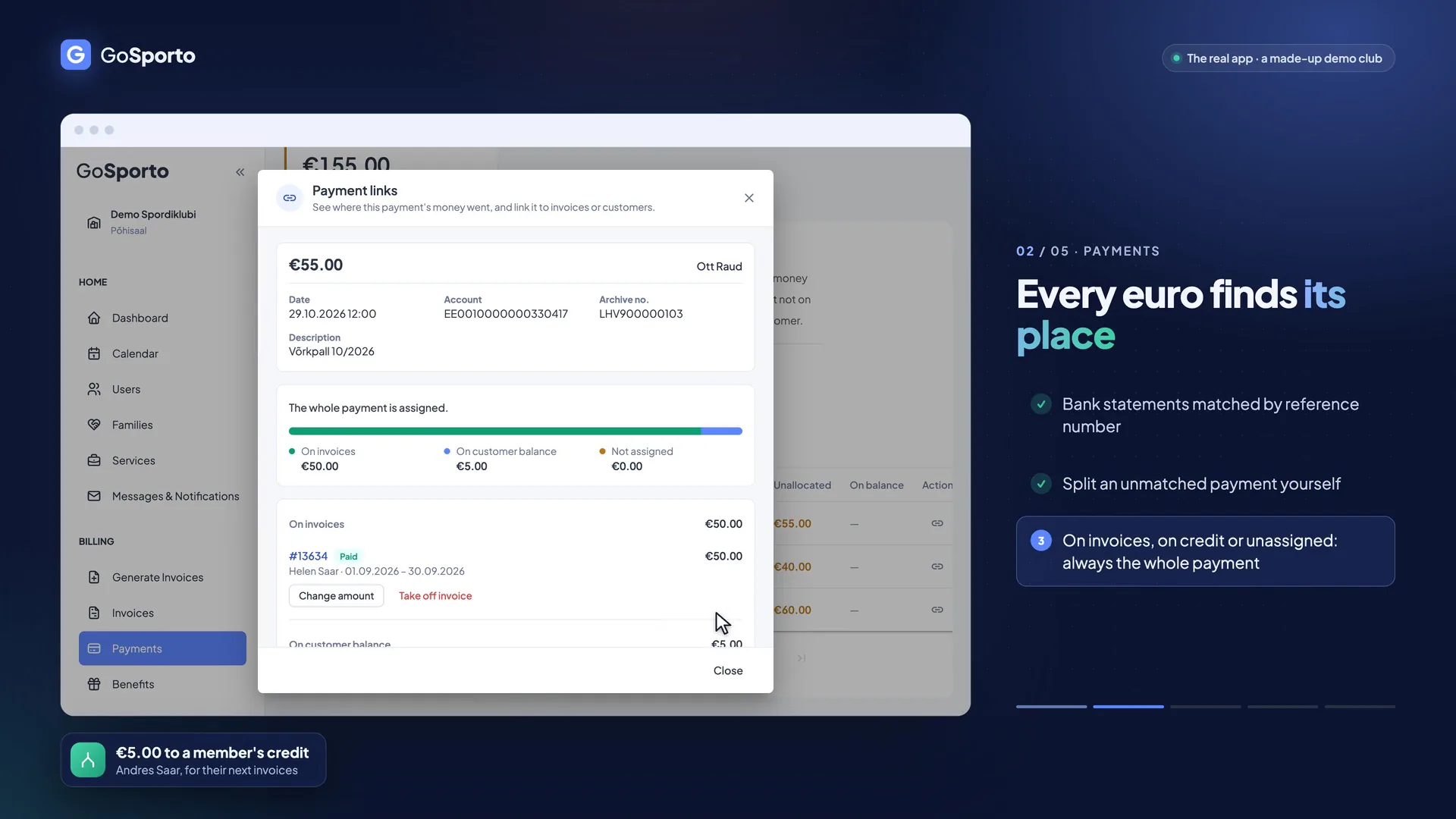
A frame from the tour: a payment split between an invoice and a member's credit, with a note beside it on what is shown Watch the tour · 1:22

No sound: every step is written on screen. The data is made up.

  • Draft, preview, confirmCheck every invoice run before anyone receives an invoice.
  • Nothing billed twiceEnforced by the database, not just by the app.
  • Bank files inLHV and Swedbank CSV, and ISO 20022 camt.053.
  • Estonian and EnglishThe interface in both; invoice emails in eight languages.

Who it's for

One system, three ways in

Everyone at the club works in the same data, but each sees only what is theirs.

Illustration of a club administrator at a tidy desk looking calmly at a laptop

Clubs and managers

Set it up once, run the month in an afternoon

Services, groups, prices and VAT are set once. Then bring in members and families, run the month's invoices, import the bank statement and see what is overdue.

  • Invoice runs you can preview
  • Bank statements matched to members
  • Overdue list with reminders

Illustration of a coach with a whistle and a tablet watching teenagers warm up on a court

Trainers

A portal of your own: your groups, sessions and members in one place

Trainers see their own sessions and the members of their own groups, mark attendance, and work with the invoices of their groups as far as the club allows.

  • Create and edit your own sessions
  • Attendance in a few taps
  • Other groups stay hidden
Illustration of a parent and a child in sports clothes walking out of a sports hall

Parents and members

Sessions, invoices and payments in one place

Members see upcoming sessions and say whether they are coming, then find their invoices and payments. A parent can have all their children on one invoice.

  • Reply to a session from an email link
  • Own invoices and payments
  • Pay by card when the club has it on

What it does

The parts of club work that are hard to get right

Billing is the core, and the rest of running a club is built around it.

Billing

Check the invoices before anyone receives them

Every run starts as a draft. You preview what will be billed, look at the totals and anything that looks out of line, and only then confirm. A charge that is already on an invoice cannot be billed a second time.

  • Monthly services, one-time fees and bookings, each billed exactly once.
  • Families: the children's services go on the guardian's invoice, and every row still says which child it is for.
  • ARNO benefit files are deducted automatically, never more than the invoice owes.
  • VAT is fixed on each invoice when it is made, so a club registering for VAT never re-prices old invoices.
  • Made a mistake? Edit the invoice and send an updated one, or issue a credit note.
Read more
A short recording of the app, with demo data.

Payments

From bank statement to paid invoice

Import the statement and every payment is matched to a member by their payment reference or by the invoice number. What cannot be matched stays with you to assign, and nothing moves between members on its own.

  • LHV and Swedbank CSV, and ISO 20022 camt.053 files.
  • A line you have already imported is skipped, so a second upload does no harm.
  • Card payments through your own Stripe account, if you want them.
  • An overdue list with a reminder per invoice or in bulk, skipping those reminded recently.
  • Exports for your accountant.
Read more
A short recording of the app, with demo data.

Sessions and attendance

Know who is coming, and who came

Plan single or repeating sessions with a capacity. Members answer from a personal link in an email, no login needed, and the club can remind those who have not answered. Afterwards the trainer marks who was there.

  • Weekly, every second week or monthly sessions, each with a capacity.
  • A reminder a set number of hours before, only to members who have not answered.
  • Present, late, absent, excused or sick, with a short reason if you want one.
  • An attendance report for the club, and members can register from their own portal.
Read more
A short recording of the app, with demo data.

Trainer portal

Each trainer sees their own groups, sessions and members

The club decides how much each trainer may do, group by group. Other groups, other prices and customers' balances stay out of their sight.

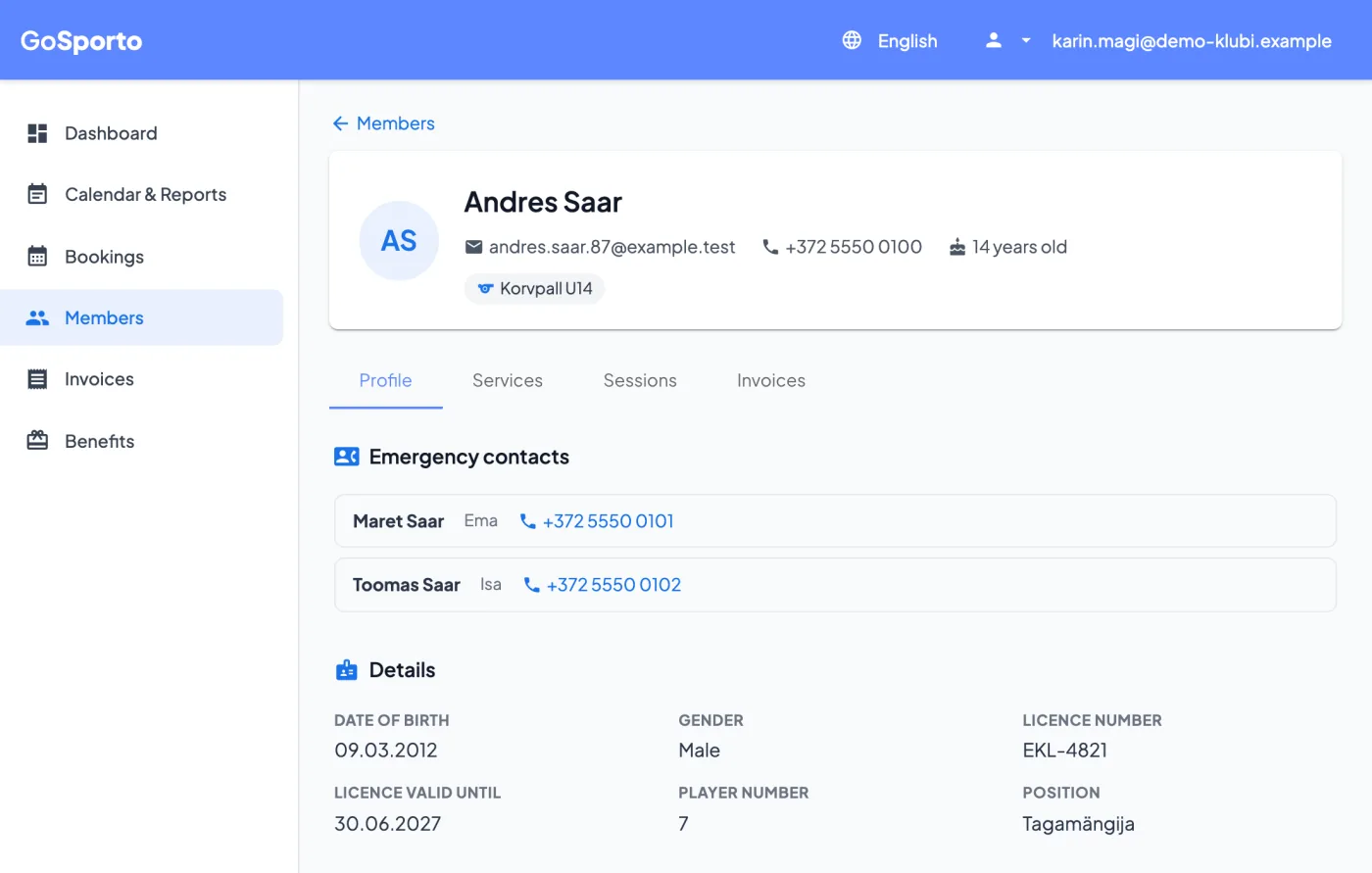
  • See the members of their groups: contact, emergency contacts, licence and how they were recorded at sessions.
  • Create and edit their own sessions with the same dialog the club uses.
  • Prepare invoice runs for their own groups; the run is a draft until it is confirmed.
  • The club switches on, per trainer and per service, whether they may edit prices, see statistics, act on invoices or see payments.
Read more
A trainer's page for a member of their group: contact details, emergency contacts, licence and position
Screenshots from the app, with demo data.

Member portal

Members find their own sessions, invoices and payments

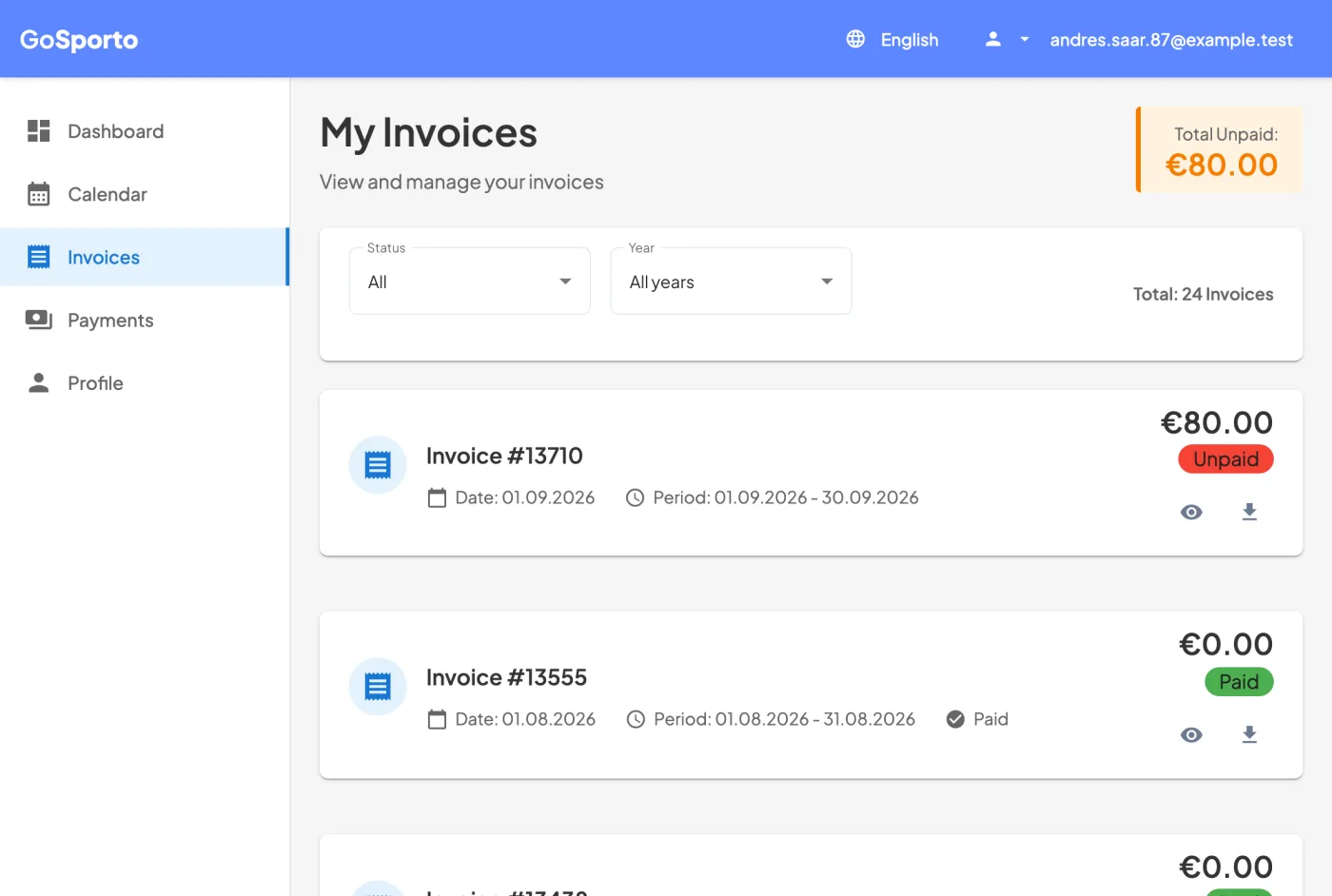
Each member, or parent, signs in to a portal that shows only their own data: the upcoming sessions and whether they have replied, their invoices with what is still to pay, and their payments.

  • Upcoming sessions, and a reply from the portal or from an email link.
  • Invoices with their status and the total still due, each one open to view or download.
  • A parent with several children sees them on one invoice.
  • Card payment when the club has connected its Stripe account.
Read more
A member's invoices page: the total still due and a list of invoices marked paid or unpaid
Screenshots from the app, with demo data.

Why clubs switch

Fewer spreadsheets, fewer questions about who owes what

The old way

  • Invoices typed into a spreadsheet, month after month
  • Bank statements ticked off by hand
  • Attendance on paper or in a group chat
  • Trainers who see either everything or nothing
  • Parents asking what they owe

With GoSporto

  • The run plans the invoices; you review and confirm
  • The statement is imported and payments are matched
  • Attendance marked on the session, with replies before it
  • Trainers see exactly their own groups
  • Members open their own invoices and payments

How it works

From first login to first invoice

No installation. You work in the browser, and so does everyone else.

  1. 1

    Set up the club

    Create the club account, then add your services, prices, VAT and payment details.

  2. 2

    Add members and groups

    Bring in members and families, give them services, invite trainers and give each the groups they run.

  3. 3

    Run the sessions

    Schedule sessions, let members reply, and mark attendance as it happens.

  4. 4

    Bill and get paid

    Preview the run, confirm it, send the invoices, then import the bank statement as money arrives.

Built for the money part

Made for the part where a mistake costs money

A ledger that is never rewritten

Every payment is a line that is added. Corrections are new lines, so the history stays whole.

A history on every invoice

Confirmed, edited, sent, reminded and credited are all recorded.

Checks that look for broken books

Built-in audit checks flag invoices and payments that do not add up.

Whole cents, one rounding rule

Amounts are kept in cents and VAT is rounded per row, the same way on screen, in exports and on the PDF.

FAQ

Questions a club asks before it starts

What is GoSporto?

A management system for sports clubs: members and families, groups and sessions, attendance, trainers, and invoicing and payments. Billing is its core.

Who sees what?

Managers see and run the club. A trainer sees only the sessions and members of the groups they run. A member sees only their own sessions, invoices and payments.

How are families billed?

A child's services can go on the guardian's invoice, which then carries one row per child. The club chooses which children and which services are combined.

Which bank files can I import?

LHV CSV, Swedbank CSV and ISO 20022 camt.053 XML. Payments are matched by the member's payment reference, then by the invoice number in the description.

Can members pay online?

If the club connects its own Stripe account, members can pay an invoice by card. Otherwise they pay by bank transfer with their payment reference, and the statement import matches it.

How does VAT work?

The VAT rate is fixed on each invoice when it is made, 0 meaning no VAT. If your club registers for VAT later, the invoices you have already made are not re-priced.

Which languages does it come in?

The interface is in Estonian and English. Invoice emails can go out in eight languages.

What does it cost?

We have not published prices yet.

Illustration of an empty, sunlit sports hall with balls and cones ready

Set up your club and run your first invoice preview

Create a club account, add a few services and members, and see what a run would bill before anything is issued.